Products
UnderCurrent SoloUnderCurrentUnderCurrent Gold
About Us
Our StoryOur Founders
Contact
Schedule a Product Demo

Conversation Intelligence

Most of what people read in a conversation is never in the words.

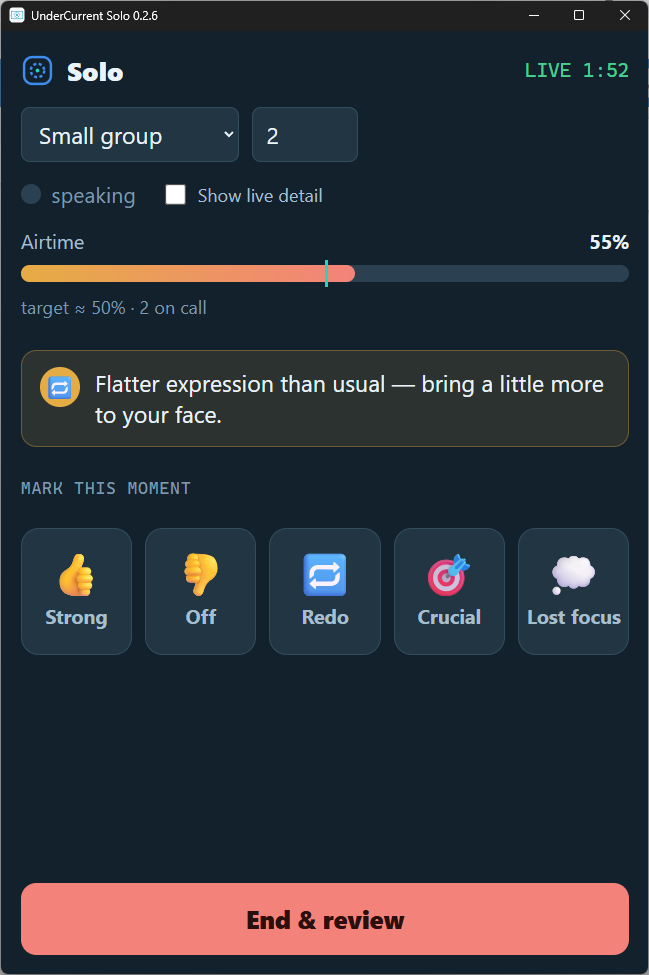
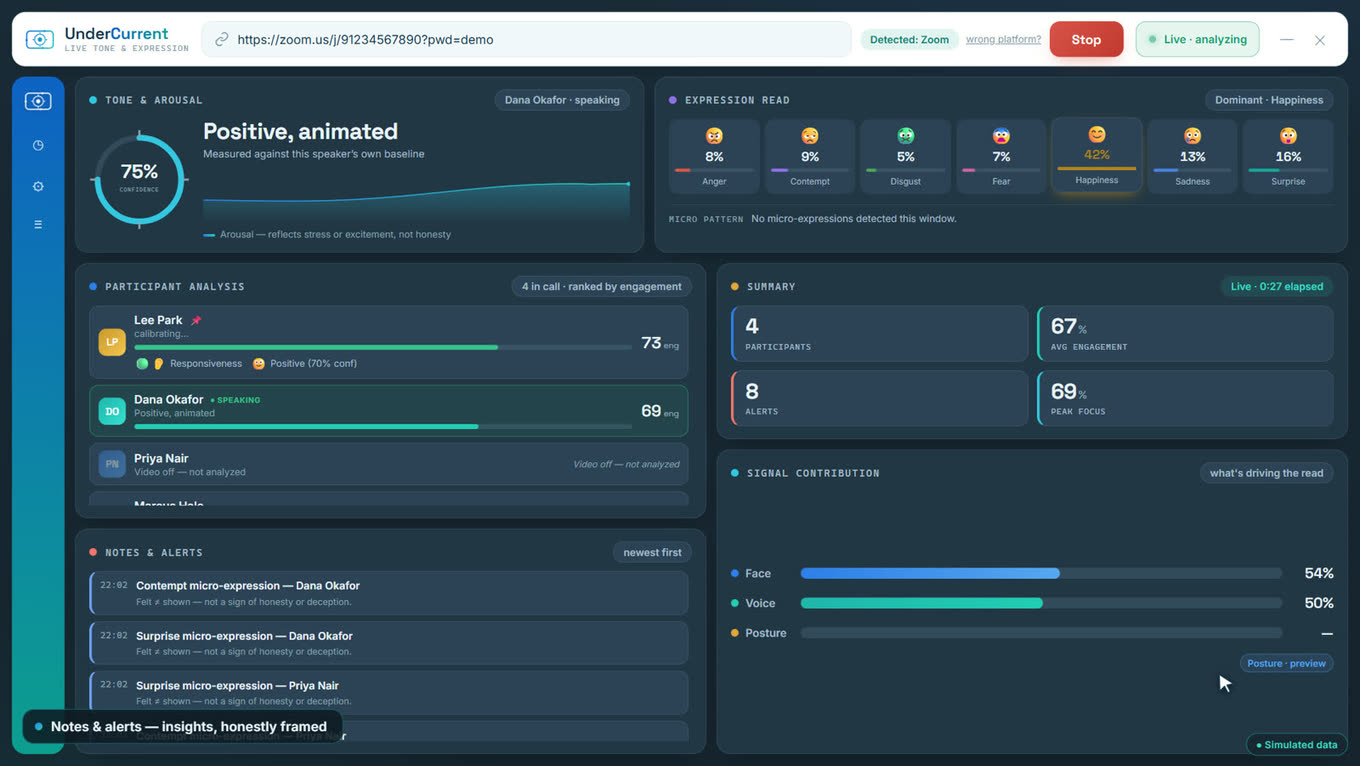
The UnderCurrent call dashboard: tone for whoever is speaking, a seven-emotion read, every participant ranked by engagement, and a feed of notes and alerts. The UnderCurrent Solo window, with a nudge reading "Flatter expression than usual — bring a little more to your face."

UnderCurrent reads the emotional undercurrent of a live conversation — tone, expression, engagement — as it happens, and tells you what you couldn't see from the inside of it. An instrument, not a camera.

It scores, it doesn't store

The signal is computed while the conversation happens and then it is gone. No archive of anyone's face.

You choose how much it sees

Solo reads only you, on your own machine. UnderCurrent reads the meeting. Which one you run is your decision.

Built to be checked

Every claim we make about data is a property of how the software is built, not a promise about how we behave.

Three ways in

One product is available today, one is in the final stages of testing, and one is further out.

Available now

UnderCurrent Solo

Private, on-device coaching for one person. Watches your own camera and microphone, coaches you live, and plays the session back with notes. Nothing leaves your computer.

See Solo →
In final testing

UnderCurrent

It joins your call and reads the room — tone, expression and engagement across the people you're talking to — and tells you what is shifting while there is still time to use it. It scores the conversation; it never stores the video.

More →
In development

UnderCurrent Gold

UnderCurrent and Solo in one integrated app: the room's side and your side of the same conversation, read together — so you can see not only how the meeting is going, but how much of that is you.

More →
UnderCurrent Solo · Windows · Free

See how you're coming across while you can still change it.

UnderCurrent Solo watches your own camera and microphone during a conversation and tells you when you're talking too long, speeding up, going flat, or haven't asked a question in a while. It never sees anyone else, and nothing leaves your computer.

Three moments, not a dashboard

Solo is quiet by design. One thing during the conversation, the detail afterwards, and a single thing to work on each week.

During

One nudge at a time

A small always-on-top strip shows your airtime, pace, pitch range and questions. When something is worth knowing it says one sentence — never a dialog in the middle of yours. One tap marks the moment so you can find it later.

After

Your own footage, your own marks

The session plays back on a timeline carrying the moments you marked alongside what Solo flagged, colour-coded and frame-aligned. Every insight asks whether it was accurate, and it remembers your answer.

Each week

One pattern, one rep

The pattern that came up most, the micro-lesson that matches it, and a two-minute practice rep — with the trend against last week. One thing, not a checklist.

It only ever watches you

This is how the software is built, not a promise about how it is operated. There is no setting that changes it.

Your computer
  1. 1
    Camera and microphone

    Yours, and only yours. There is no second participant to open.

  2. 2
    Read on the spot

    Expression, tone and timing become numbers here, by code that shipped inside the app.

  3. 3
    One line on your screen

    What comes out is a sentence, drawn on your own display.

  4. 4
    Gone when you close it

    Playback is held in memory while you are watching it, and discarded when you leave.

Everywhere else
  • Our servers
  • Anyone else's servers
  • The internet

Not switched off and not opted out of — absent. There is no networking code in the shipping build, so there is no line to draw here.

Where your face and your voice go while Solo is running, and the one place they don't. This describes Solo; UnderCurrent and Gold read a live call and work differently.
What the shipping build does
  • Your camera and microphone only. There is no meeting bot and no second participant's audio. Solo cannot see or hear the people you are talking to.
  • Coaching runs in memory. Session playback is held in memory while you review it and discarded when you leave.
  • No network code at all. Nothing is uploaded, because there is nothing in the app that can upload. It works with the internet switched off.
  • No account, no sign-in. Installs for you alone, in your own user folder, and never asks for an administrator password.

Face and voice are biometric data, which is exactly why Solo keeps them on the machine they were recorded on.

StrongOff RedoCrucial

The four marks you can tap mid-conversation. They stay on your computer and are only ever shown back to you.

Free — and invitation-only while it's in beta

Solo is free. Not a trial, not a tier with the good part held back — the whole thing, at no cost, for as long as you want it. What is limited right now is how many people we hand it to at a time, and that is temporary: when Solo reaches the Microsoft Store, anyone will be able to install it without asking us first.

What you'd get

An installer and a one-time installation code. The installer is per-user and never asks for an administrator password.

The code exists for one reason: the build is not code-signed yet, so Windows shows a SmartScreen warning the first time you run it. We would rather walk a few people past that than have a stranger meet it alone and assume the worst. Once the Store signs the app, the warning goes away and so does the code.

[email protected]

Windows 10 or 11 · a webcam and a microphone · about 110 MB

UnderCurrent · In final testing

Read the room while you're still in it.

It joins your video call and reads tone, expression and engagement across the people you are talking to, then tells you what is shifting — who has gone quiet, where the energy dropped, when you lost them — while the meeting is still running. It scores the conversation; it never stores the video.

The UnderCurrent dashboard during a call: tone and arousal for whoever is speaking, a seven-emotion expression read, every participant ranked by engagement, and a timestamped feed of notes and alerts.
Interactive walkthrough · 10 steps
Take the dashboard apart, one panel at a time

A guided tour of the live call view: what each panel is reading, how participants are ranked and rotated, and how carefully the insights are worded. It runs on simulated data — UnderCurrent never records a call, so there is no real footage to show you.

Open the walkthrough →

Where it is

UnderCurrent is in the final stages of testing. The software is built and running — what is left is the work that comes before putting it in other people's hands.

We are not taking general sign-ups yet. If you want to be in the first group to use it, tell us what you would use it for; it genuinely shapes the order things get finished in.

UnderCurrent Gold

Both sides of the same conversation.

Everything in UnderCurrent and everything in Solo, in one fully integrated app. The room's side and your own side read against each other — so the question stops being “how did that meeting go” and becomes “how much of that was me”.

Not ready yet

We're building it. If Gold is the one you're waiting for, tell us what you need from it — it genuinely shapes what gets built first.

About us

Why we're building UnderCurrent.

01Our Story

UnderCurrent was ideated when our founder was on a video call and it seemed like the person he was talking with was extremely excited to work with him. After the call ended he came to the conclusion that he really had no idea how that person actually felt. That's when he thought of a tool that could be on a call, helping him understand what was really happening.

The next day he was walking by his son's bedroom who was playing online with a friend, while talking to him on Zoom. Listening in on their conversation, he concluded that the friend was politely trying to disconnect. The son (who has a very hard time reading social cues) was completely ignoring the polite insinuations made by his friend. Eventually forcing our founder to intervene.

Floating the idea with various individuals made it clear that this was a real unmet need.

02Our Founders

Oded BiranOB

Oded Biran

Founder

Oded Biran has been a licensed attorney in Israel for over 20 years. He rose through the ranks — from associate in a small law firm to chief legal officer of a NASDAQ-traded company. Eventually transitioning to the business side, Oded founded and exited from a blood-based neurodegenerative diagnostics company.

Throughout his career, Oded has specialized in finding the avenue to pursue business goals in highly regulated, technologically complex industries, while maintaining high moral ground.

Oded is also the father of neurodiverse children.

David KleinDK

David Klein

Co-Founder

David Klein, MBA, has built and led operations for companies in highly regulated industries for over 20 years.

David established three international logistics centers and has built clinical and billing operations that supported agreements with major insurers. He brings that experience to turning technical innovation into customer adoption and a sustainable business.

David is also the father of neurodiverse children.

Get in touch

Schedule a product demo.

Tell us a little about what you're trying to improve and we'll set up a walkthrough. If you'd rather just try something today, UnderCurrent Solo is free and takes a couple of minutes to install.

Or write to us directly at [email protected].
Legal

Privacy Notice

Applies to: UnderCurrent Solo for desktop · UnderCurrent Solo in your browser (web beta)
Desktop app: version 0.1.0 and later · Web beta: all versions · Effective and last updated 16 October 2026

The short version

  • The desktop app does not collect your data. It watches your own camera and microphone, works out what it needs while you talk, and forgets it.
  • Nothing is uploaded from the desktop app. The app contains no code capable of sending anything anywhere. It works with the internet switched off.
  • In both versions, your recording never reaches your hard disk. It is held in memory for you to review and discarded when you leave the session.
  • From the desktop app, the only way anything reaches us is if you write to us, using the feedback button or your own email.
  • In the web beta, your video and audio never leave your browser. Solo works out what it needs in the browser tab, in memory, while you talk.
  • The web beta checks your email once, to give each person three free sessions. We keep a one-way fingerprint of your address, not the address, and a count of the sessions used (section 5b).
  • The web beta sends anonymous usage counts. They cannot be linked to you. You can switch them off in Settings, and your browser's Global Privacy Control switches them off for you (section 5a).
  • The web beta sets no cookies. It keeps a few small entries in your browser's storage, which section 3 lists, and nothing about what you said.

1Who is responsible

At this time, UnderCurrent Solo is provided by Oded Biran ("we", "us"). You can reach us at privacy@undercur.com, which is the fastest way to get an answer from a person.

This notice covers two things: the desktop application named UnderCurrent Solo, and the web beta named UnderCurrent Solo in your browser. It also covers this website. It does not cover any other product, and it does not cover research software distributed separately under a different name and a separate written consent.

The web beta uses two service providers. Cloudflare hosts the web app and runs the servers that check your email and receive the anonymous counts. Resend sends the sign-in code by email. Sections 5a and 5b say what each one sees.

At this time, the web app is not offered in the European Union, the EEA, the United Kingdom or Switzerland, or in the states of Illinois, Texas or Washington.

2What Solo accesses on your computer

When you start a session, Solo opens your own camera and your own microphone. It uses them to work out, moment to moment, how you are coming across: how long you have been speaking, how fast, how much your pitch is moving, where you are looking, how expressive your face is, and whether you have asked a question recently.

Your browser asks your permission before the web beta can use your camera and microphone. The permission belongs to this site, and you can take it back at any time in your browser's site settings (in Chrome, the icon at the left of the address bar). Solo releases both devices when a session ends.

All of that is computed on your computer while it happens. The measurements exist for as long as the session is open and are gone when it closes.

Solo cannot see or hear the people you are talking to. It does not join your meetings, it is not a meeting bot, and it has no access to any other application's audio or video. Solo records you, not your call. It uses only your camera and microphone and receives nothing from your meeting app. If your speakers play the call aloud, your microphone may also pick up other people's voices. That sound stays in memory with your recording (in the web beta, in the browser tab's memory) and is discarded when you leave the session (in the web beta, when you leave the review). Using headphones keeps other voices out. The web beta's terms say what you are responsible for if other people may be heard.

Your face and voice are biometric data under the law of several countries. That is precisely why Solo processes them on the machine they were captured on and never sends them anywhere.

3What Solo stores

For the coaching features, nothing. The session video and audio are held in memory so that you can play the session back immediately afterwards, and are discarded when you leave the session or close the app (in the web beta, when you leave the review or close or reload the tab). They are not written to your hard disk and there is no export.

The marks you tap during a conversation, and the notes Solo shows you afterwards, live in memory for the same period and are discarded with it.

In the desktop app, two small operational files may exist on your own computer, and neither contains anything about you or about what you said:

  • install-record.txt, in the application folder, if you installed from an invitation-only build. It records the version, the install date, and which of the issued installation codes was used — an identifier such as M3, never the code itself and nothing about you. It exists so that a support conversation can tell one test machine from another. It is never transmitted.
  • Standard desktop and Electron application files (window size, application logs) in your own user profile, written by the operating system and the application framework in the ordinary way.

In the web beta, the app keeps a few small entries in your browser's local storage on this device. None of them holds anything about what you said or showed.

  • solo.auth: your sign-in. It holds your role (free or tester), the masked form of your address (its first letter, three dots and the part after the @), how you signed in, the version of the terms you agreed to, a sign-in token signed by us, and how many free sessions you have left. The token carries your one-way fingerprint, not your address, and expires after 180 days.
  • solo.counting: your choice for the Settings switch for anonymous usage counts. It is written only when you change the switch.
  • solo.count.stamps: the day and month Solo last opened with counting on, and that it has ever done so. It is how the anonymous counts can say "first time today, this month or ever" without any identifier (section 5a).
  • solo.tester.nolimit: beta testers only. Whether the testers' switch that lifts the 40-minute limit is on.

The web beta uses no cookies, no session storage, no database in your browser and no offline cache. It loads again from our host each time you open it. Your browser may keep ordinary cached copies of the app's files, as it does for any website; those are the program itself, not anything about you. To clear the entries above, use Sign out in Solo's Settings (which removes your sign-in) or delete this site's data in your browser's site settings.

4What Solo does not do

For the desktop app:

  • It has no network code. There is no component in the application capable of opening a network connection, and an automated test enforces that on every build. Nothing can be uploaded, because there is nothing to upload with.
  • There is no telemetry, no analytics and no crash reporting inside the application.
  • There is no account, sign-in, license check or activation. We do not know that you installed it and we do not know when you use it.
  • There are no advertisements and no third-party trackers, in the app or on this website.
  • We never sell, rent or share your data. In the desktop software we do not have any. For the web beta, what we hold is limited to what sections 5a and 5b describe.

The web beta is a web page, loaded from our host, and it then talks to our servers for two purposes only:

  • It sends only what sections 5a and 5b describe. After the page has loaded, the only requests the web app makes go to its own address: for the sign-in and the free-session count (your email address and the code, then the signed token when a session starts and ends), and for the anonymous count. A Content-Security-Policy that your browser enforces blocks every other destination.
  • Nothing in the beta sends your video and audio. Not to us, not to a provider, not to anyone. Nor are the measurements Solo works out from them.
  • There is no analytics service, no advertisement and no third-party tracker in the web app. The only counting is the anonymous count in section 5a, which we run ourselves.

5The exceptions, stated plainly

There are three ways information can reach someone other than you when you use the desktop app or read this website. The web beta adds two more, in sections 5a and 5b; those happen when you use the web app, and they are described field by field.

If you write to us. Solo has a feedback button that opens your email program with a message already addressed to us. Nothing is sent until you send it, and you can see and edit everything in it first. If you do send it, we receive your email address and whatever you chose to write, and we keep it for as long as we need it to answer you and to fix what you told us about. You can ask us to delete it at any time.

If you installed from the Microsoft Store. Microsoft is the distributor and tells us how many people installed the app, how often it is opened, which country and which version - as counts and aggregates, never as individuals, and never anything about what happens inside a session. That collection is Microsoft's, under Microsoft's privacy statement, and it happens whether or not you ever open the app.

This website is a set of static pages with no accounts, no analytics and no cookies. Our hosting provider processes your IP address and browser type in its ordinary server logs to deliver the page and to resist attacks, as any web host does. The web app lives at a separate address and is covered by sections 5a and 5b. The page where our own staff read the usage figures is a third address, behind a login for our staff only; any cookie that login uses is set on that address only, never on the web app.

5aUsage counting in the web beta

The web beta sends one small anonymous message when Solo opens, when a session starts and when a session ends. This is what it includes:

  • event: any of: app_open, session_start and session_end.
  • v: the version number of the app.
  • browser and os: your browser (chrome, edge, firefox and other) and your system (windows, macos and other), as a category only.
  • camera: whether the camera was on or off.
  • minutes and reached_limit: sent when a session ends. How long it ran, in bands (0-5, 5-15, 15-30 and 30-40 minutes), and whether it ran to the 40-minute limit.
  • first_today, first_month, first_ever: three yes-or-no flags, worked out in your browser from the dates in solo.count.stamps.
  • country: not sent by your browser. Cloudflare's network adds the two-letter country code of your connection when the message arrives. Nothing else about the connection is read.

It does not include: your email address, a name, your sign-in token, your fingerprint, or anything Solo heard or saw. A message is capped at 512 bytes, and the server refuses anything outside this list.

Its Purpose: To know how many people use our software, for how long and on what kinds of computer, so that we can decide how to improve it and whether it should continue. Nothing in a count identifies you, and the counts are kept in a different place from the email records, with nothing that joins them.

Retention. Cloudflare's analytics service keeps the individual counts for three months and then deletes them. From them we keep monthly totals (a month, a name and a number, such as how many sessions ended in a band), with no identifiers. We keep the monthly totals.

Daily totals. Separately, the sign-in server keeps tester_session, free_session, released and deletion as daily totals (the names in the code: free sessions counted, tester sessions started, starts released unused, and deletions carried out). Each is a day, a name and a number.

Switching it off. Counts are on by default. Switch them off at any time in Solo's Settings ("Send anonymous usage counts"). If your browser sends Global Privacy Control, Solo treats it as the off switch and sends nothing while it is on. Switching counts off changes nothing else in the app.

5bYour email, for the free sessions

Purpose. To make sure each person gets three free sessions of up to 40 minutes. A session counts as one of the three once it passes one minute. If it ends sooner, it is not counted.

The code. You enter your address and confirm that you are 18 or older and agree to the terms. We email you a six-digit code through Resend, a US-based service. The code works for 10 minutes and for five tries, and we send at most three codes an hour to one address. Your address reaches our server when you ask for the code and again when you enter it, so that the server can check it. We do not store it.

What Resend keeps. Resend keeps a copy of each email it sends, including your address, for 30 days in the United States, and then deletes it.

What we keep about you is this, and nothing else:

  • a one-way fingerprint of your address: a keyed hash made after the address is put in a standard form (lower case, any +tag removed and, for Gmail, the dots removed, so that J.Doe+solo@gmail.com and jdoe@gmail.com are one person). We can compute it from an address someone gives us; we cannot turn it back into an address;
  • how many of your three free sessions have been used, and whether a session has started and not yet passed the one minute mark;
  • the version of the terms you agreed to, and when;
  • when we first saw your fingerprint, when you last asked for a code and when you first confirmed one;
  • while you sign in, for a few minutes at most: a hash of your code, a count of tries and a count of codes sent in the hour.

We never store your address, your IP address or your browser's user-agent text in this record. Cloudflare, which hosts the record and the servers, sees your IP address in the course of delivering the request.

Beta testers. A tester's address is recognized by the same kind of fingerprint, held in a list that only the server reads. A tester can also sign in with a personal code, which the server keeps only as a keyed hash. Removing an entry from the list ends that tester's access.

Retention. Until 30 days after the web beta ends, or until you ask us to delete it, whichever comes first.

Deletion on request. Write to privacy@undercur.com from the address concerned. We compute the fingerprint from the address you write from, show what the record holds, delete it, and keep nothing ourselves. Cloudflare, which hosts our database, keeps a restore history of the whole database for 7 days, so a deleted record can still exist in that history for up to 7 days. Deleting the record will cause any sign-in you had to stop working. Resend deletes its copy of the code email on its own schedule, 30 days after it was sent, and we cannot delete it sooner.

No marketing email, ever. The only email the web app sends you is the sign-in code.
6Your rights

Depending on where you live you may have rights to see the personal data an organisation holds about you, to correct it, to have it deleted, to restrict or object to its use, and to complain to a regulator.

For the desktop app these rights are simple to exercise, because the only personal data we hold is correspondence you chose to send us. Write to privacy@undercur.com and we will tell you what we have and delete it on request.

For the web beta, the anonymous usage counts cannot be linked to a person, so there is nothing to retrieve or delete. The email fingerprint can be found from your address, so you can ask us to find it, tell you what it holds and delete it: write to privacy@undercur.com from that address. Resend deletes its copy of the code email on its own schedule, 30 days after it was sent, and we cannot delete it sooner. Cloudflare, which hosts our database, keeps a restore history for 7 days, as section 5b says.

For everything the app works out about you, there is no request to make: it is on your computer (in the web beta, in your browser tab), we never had it, and uninstalling the app, closing the session or closing the tab ends it.

7Children

UnderCurrent Solo is not directed at children and is for people who are 18 or older. The web beta asks you to confirm that you are 18 or older before it sends you a code. We do not knowingly collect anything from children. Since the desktop app collects nothing from anyone, a child using it is in the same position as anyone else: nothing leaves their computer. In the web beta, the only things we hold are the ones in sections 5a and 5b.

8Changes to this notice

If we change what the app does with your data, we will change this notice and move the date at the top before the change ships. For the desktop app, a change that would cause anything to leave your computer would be a new version of the application with its own, separate consent, which you would have to agree to in the app. It would never be introduced quietly into a version you already trust.

For the web beta, a web page always loads the current version, so the rules are these. The version of this notice and of the terms is shown in the app. A change to what leaves your browser is shown in the app, and you must accept it there before it takes effect. Changes from previous versions are:

  • 16 October 2026 (this edition): the web beta added to the notice, sections 5a and 5b added, and each claim in the other sections scoped to the desktop app or the web beta.
  • 1 October 2026: The first notice, for UnderCurrent Solo for desktop.

Changes to what leaves your browser since the web beta began: none.

9Contact

Email
privacy@undercur.com
Responsible
Oded Biran, United States. UnderCurrent is not yet incorporated; this notice will name the company as soon as it is.
Providers
Cloudflare (hosting and network, for the web beta) and Resend (the sign-in email, for the web beta), as described in sections 1, 5a and 5b.
Complaints
Tell us first — we would rather fix it than have you go around us. You can also complain to the U.S. Federal Trade Commission at reportfraud.ftc.gov, or to the attorney general of your state.